
Photo Data by (Exiƒ Photos)1.6 - App Store
You'll be able to see results in few seconds.
Publisher Description

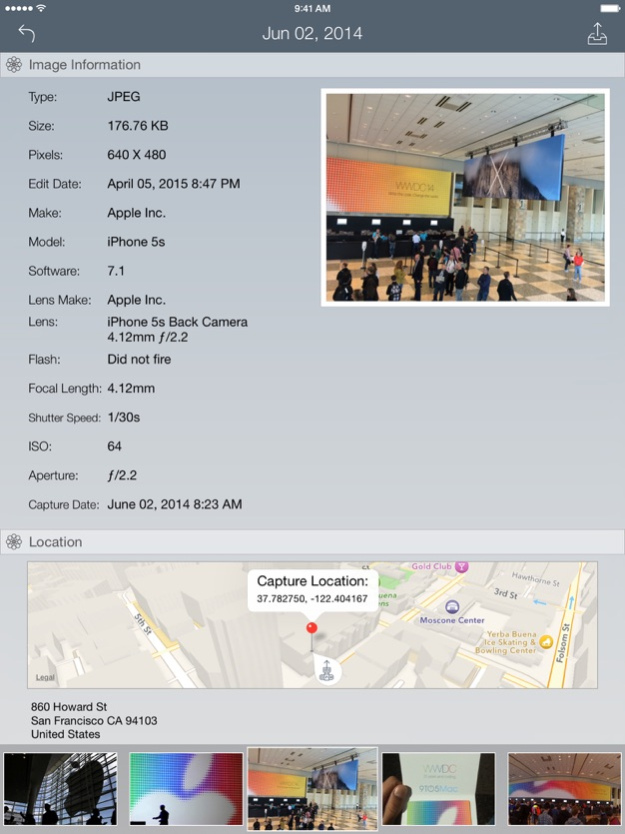

Exiƒ Photos is a simple but ELEGANT photo/image metadata editor, viewer, & remover.
View all, edit, or remove photo metadata such as EXIF, TIFF, GPS, and any other available metadata. Photographers no need to buy a GPS Geo Tagger for tagging your photos, you can add or edit a GPS tag to your photos with this app. You can also add © copyright, artist name, comments, descriptions, hardware info, software, and most importantly Emojis!. Please look below for a sample of detailed items you will be able to add, edit, or delete from your photos.
Metadata Add/Edit Features:
Editing / Adding Options:
GPS location with a map view
Copyright ©
Artist
Description
Comments
Camera Make
Camera Model
Lens Make
Lens Serial #
Software
Emojis!
Exporting Options:
Share
Upload
Save
Export with or without metadata.
Sort Photo Collection Options:
Date Captured or Created
Date Modified or Edited
Shared Albums via iCloud
Your Created Albums
Synced Albums
Faces
Photo Stream
Recently Added
Panoramas
Favourites
Photo Editing:
Make Favourite
Revert to original
Crop
Rotate 30°
Delete (only if photo isn’t a favourite)
Edit a version with or without metadata.
Some Other Awesome Features & Functionalities:
iMeta Action allows you to inspect & remove it before sharing, anywhere
Get photo location and lens direction on the map.
Remove metadata before sharing without modifying your negatives
Open iMeta directly in the Photos app with Photo Edit extension
Use iMeta’s Camera to take photos without detailed metadata
Inspect essential EXIF, TIFF, & GPS data of a photo/image.
Choose over 246 different color themes
Privacy Protection:
If you care about your privacy iMeta will become your APP in shining armour. iMeta allows you to inspect/remove your photo’s metadata before uploading or sharing with the information world we live in today. Not just the date and time is being captured while taking photos. Oh, no no no, metadata can store sensitive information about you and your photos.
{GPS} Metadata Tag
Have you ever taken a photo and the tagged address recorded was wrong, because of weak signal? Well now you have the ability add, edit, or remove. Note that GPS data will only be included if location services are enabled for the camera app in the iOS Privacy Settings.
Please note that on other cameras and smartphones not all metadata may be included by default. The file creation date is not a guarantee when the photo was taken, but the EXIF timestamp is the time the photo was actually taken. Requires (in-app purchase) to add or edit metadata to photos.
Coming Soon…
Camera Image File Format (CIFF)
JPEG File Interchange Format (JFIF)
International Press Telecommunications Council (IPTC)
Graphics Interchange Format (GIF)
May 27, 2016
Version 1.6
Adding GPS Metadata Location bug = FIXED
About Photo Data by (Exiƒ Photos)
The company that develops Photo Data by (Exiƒ Photos) is John Rhea. The latest version released by its developer is 1.6.
To install Photo Data by (Exiƒ Photos) on your iOS device, just click the green Continue To App button above to start the installation process. The app is listed on our website since 2016-05-27 and was downloaded 0 times. We have already checked if the download link is safe, however for your own protection we recommend that you scan the downloaded app with your antivirus. Your antivirus may detect the Photo Data by (Exiƒ Photos) as malware if the download link is broken.
How to install Photo Data by (Exiƒ Photos) on your iOS device:
- Click on the Continue To App button on our website. This will redirect you to the App Store.
- Once the Photo Data by (Exiƒ Photos) is shown in the iTunes listing of your iOS device, you can start its download and installation. Tap on the GET button to the right of the app to start downloading it.
- If you are not logged-in the iOS appstore app, you'll be prompted for your your Apple ID and/or password.
- After Photo Data by (Exiƒ Photos) is downloaded, you'll see an INSTALL button to the right. Tap on it to start the actual installation of the iOS app.
- Once installation is finished you can tap on the OPEN button to start it. Its icon will also be added to your device home screen.
Program Details
System requirements
Download information
Pricing
Version History
version 1.6
posted on 2016-05-27
May 27, 2016
Version 1.6
Adding GPS Metadata Location bug = FIXED
version 1.6
posted on 2016-05-27
May 27, 2016 Version 1.6
Adding GPS Metadata Location bug = FIXED
version 1.6
posted on 2015-05-31
version 1.6
posted on 1970-01-01
27 мая 2016 г. Version 1.6
Adding GPS Metadata Location bug = FIXED
version 1.6
posted on 1970-01-01
2016年5月27日 Version 1.6
Adding GPS Metadata Location bug = FIXED
Disclaimer
Official App Store Link
We do not host the Photo Data by (Exiƒ Photos) app on our servers. We did not scan it for viruses, adware, spyware or other type of malware. This app is hosted by Apple and passed their terms and conditions to be listed there. We recommend caution when installing it.
The App Store link for Photo Data by (Exiƒ Photos) is provided to you by apps112.com without any warranties, representations or guarantees of any kind, so access it at your own risk.
If you have questions regarding this particular app contact the app developer directly. For questions about the functionalities of the apps112.com website, contact us.
